Guide · AI Assistants
ChatGPT review 2026: GPT-6, Work, Codex, dots, Go to Pro pricing, pros, cons and who it suits
Our ChatGPT review covers GPT-6 in chat, ChatGPT Work, Codex, voice, images and dots, plus Free, Go, Plus and Pro pricing, ads, pros, cons and who should use it.

The short answer
ChatGPT is the most complete all-round AI assistant in 2026, with GPT-6 in chat, an agent called ChatGPT Work, the Codex coding agent, voice, images and deep research in one app. The free plan is generous but may show ads. Go costs $8 a month, Plus $20 and Pro $100, $200 or $500 in the US, and Plus is the best value for most people.
ChatGPT is still the AI assistant most people try first, and in 2026 it is much more than a chatbot. It now combines GPT-6 in chat, an agent called ChatGPT Work, the Codex coding agent, voice, image generation, deep research and, on Pro, always-on agents called dots. This review covers what ChatGPT can do, what each plan costs, where it is strong and where it falls short, and who should use it. It is based on OpenAI’s own pricing page, help center and release notes as of October 2026. We haven’t run extended hands-on tests, so treat the strengths below as what OpenAI documents rather than our own measurements.
ChatGPT at a glance
| ChatGPT | |
|---|---|
| What it is | An AI assistant with built-in tools and agents |
| Made by | OpenAI, first released November 30, 2022 |
| Platforms | Web, iOS, Android, and desktop apps for macOS and Windows |
| Free plan | Yes, with unlimited everyday text chats and limited tools; may show ads |
| Paid plans (US) | Go $8, Plus $20, Pro $100, $200 or $500 a month; Business and Enterprise |
| Models | GPT-6 in chat on paid plans; GPT-6 Astra, GPT-6.1 Sol and others in Work and Codex |
| Best for | People who want one assistant for writing, research, coding, voice and images |
What ChatGPT can do
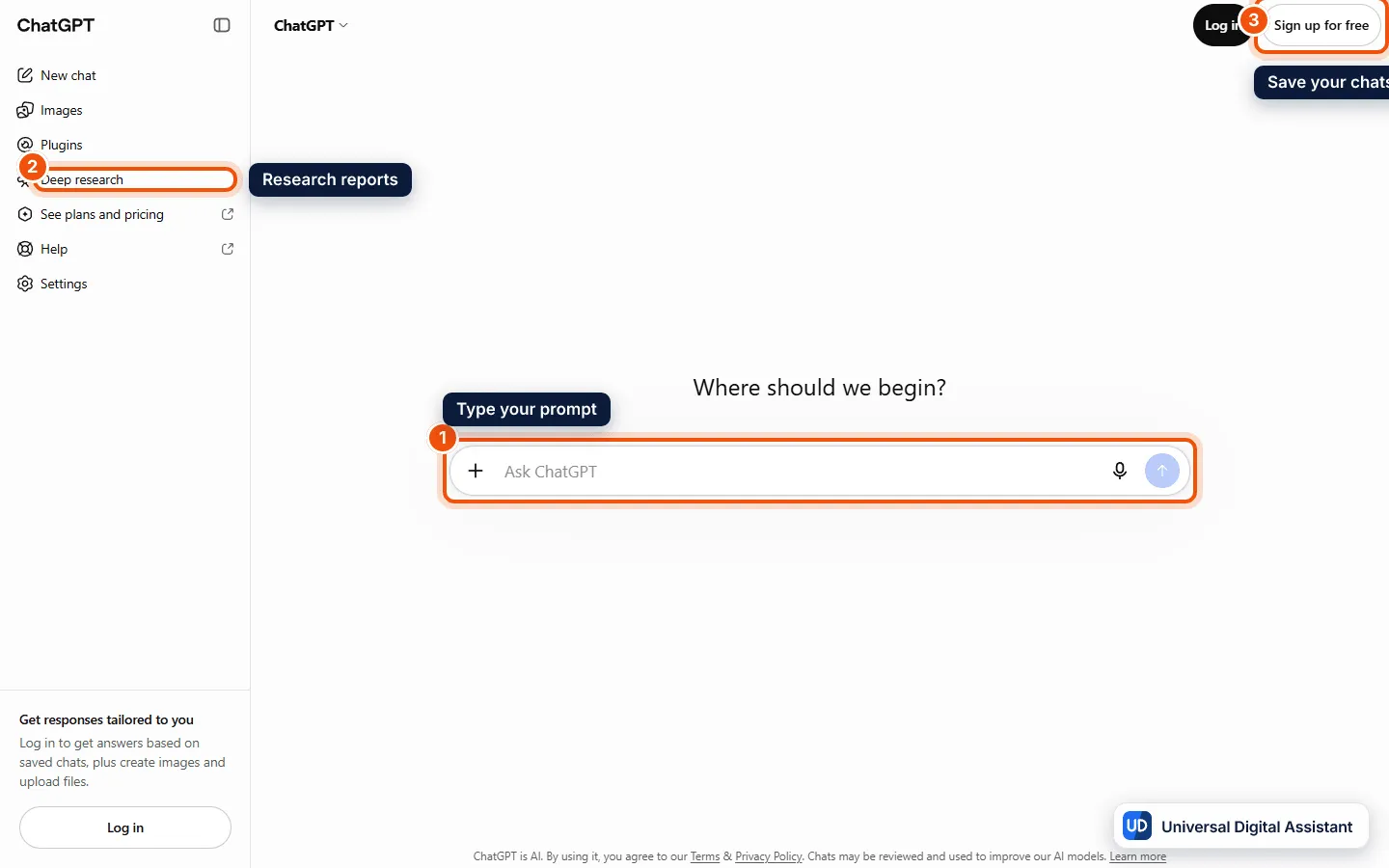
Screenshot: ChatGPT at chatgpt.com, signed out. You can type a prompt straight away (1); deep research sits in the sidebar (2), and a free account (3) saves your chats. Captured by Universal Digital Assistant on October 20, 2026.
- GPT-6 with Intelligent UI. Since October 7, 2026, GPT-6 is the default in chat for paid plans. OpenAI says answers can now mix text with visuals and interactive elements, such as side-by-side comparisons, diagrams and small tools like calculators, and that GPT-6 can start answering while it keeps thinking. A thinking slider lets you choose Instant, Medium, High or, on Pro, Extra High and Pro. Our ChatGPT models explained guide covers which model sits behind each option.
- ChatGPT Work. OpenAI’s agent for multi-step projects can create documents, spreadsheets and presentations, use connected apps and work in a browser. Free and Go get limited use in the desktop app; Plus and Pro get it on desktop, web and mobile. See What is ChatGPT Work?.
- Codex. OpenAI’s coding agent is included on every plan, with limited use on Free and Go and more on Plus and Pro. Codex Cloud, added on September 29, runs tasks in isolated cloud workspaces that keep going while your computer sleeps. Read Codex Cloud explained.
- Deep research, search and files. ChatGPT searches the web, analyzes uploaded files and data, and runs deep research that reads many sources and writes a cited report. Since October 6, paid plans can also upload audio files for transcripts and summaries.
- Voice and images. ChatGPT Voice now uses GPT-Live-1.1, with new voices added on October 15, and it can use plugins during a call. Image generation is on every plan, with image generation with Thinking on Plus and Pro. Our guides to ChatGPT Voice and ChatGPT Images 2.5 go deeper.
- Memory, projects and privacy tools. ChatGPT can remember details across chats, keep related work in projects and, on paid plans, run scheduled tasks. Locked chats, rolling out from October 20, hide chosen conversations behind a PIN. See ChatGPT memory explained.
- Office and plugins. Add-ins bring ChatGPT into Excel, Word, PowerPoint and Google Sheets, and plugins connect apps such as Gmail and Google Calendar. See ChatGPT for Excel, Word and PowerPoint.
- Pro extras: dots, Space, Pages and Slides. Dots are always-on agents, powered by GPT-6 Astra, that keep working toward a goal between conversations; at launch they exclude the EEA, Switzerland and the UK. Space gathers Pages, files and shared work, and Slides, added on October 16, builds decks you can edit with your team. Read ChatGPT dots and ChatGPT Space and Pages.
What ChatGPT costs
OpenAI’s pricing page renders local prices, so we took US prices from its help center and announcements. As of October 2026:
| Plan | Price (US) | Highlights |
|---|---|---|
| Free | $0 | Unlimited everyday text chats; limited uploads, images, voice, deep research, memory, Codex and Work on desktop; may show ads |
| Go | $8 a month | More messages with tools, uploads, image creation, voice chats and longer memory; may show ads |
| Plus | $20 a month | GPT-6 with Medium and High thinking, expanded deep research and Codex, Work on desktop, web and mobile, legacy models, no ads |
| Pro 100 | $100 a month | Pro reasoning powered by GPT-6 Astra, Extra High thinking, your first dot, maximum deep research and memory |
| Pro 200 | $200 a month | More usage than Pro 100 |
| Pro 500 | $500 a month | The highest usage, plus Ultrafast GPT-6 Astra and GPT-6.1 Sol in Work and Codex |
A few details matter before you pay:
- Monthly billing only. OpenAI doesn’t offer annual billing or multi-month prepayment for Go, Plus or Pro.
- Pro is not unlimited. GPT-6 Pro has its own usage limits, and Work and Codex have separate allowances. You can buy credits for Codex, Work and the Office add-ins once your allowance runs out. New Pro 200 subscribers get a lower allowance than before; existing subscribers keep the old one until October 29, 2026. Our ChatGPT Pro explained guide has the details.
- Context differs by plan. OpenAI lists a total context window of 27K tokens on Free, 54K on Go and Plus and 128K on Pro for Instant answers, rising to 256K on Go and Plus and 400K on Pro for reasoning.
- Ads on the cheaper plans. Ads may appear for Free and Go users below a response. OpenAI says they don’t influence answers, and you can turn off ad personalization in Settings under Ad Controls. Our ChatGPT ads explained guide covers how to avoid them.
- Plans for organizations. Business plans start at two users and Enterprise is sold through OpenAI’s sales team. OpenAI’s pricing page says nonprofits can get up to 75% off Business or Enterprise, and verified US K–12 teachers can use ChatGPT for Teachers free through June 2027.
If you’re deciding between the two cheaper paid plans, read ChatGPT Go vs Plus.
Pros
- The widest feature set of any assistant, from chat and voice to images, deep research, coding and agents, in one account.
- A strong free plan with unlimited everyday text chats.
- GPT-6 with Intelligent UI makes answers easier to scan, with charts, comparisons and interactive tools when they help.
- Good value at $20. Plus includes the main tools most people need, with no ads.
- Works everywhere, on the web, phones, new desktop apps for macOS and Windows, and inside Office.
- Fast pace of updates, with new features most weeks.
Cons
- Ads on Free and Go. They are labeled and kept separate, but they are there.
- Confusing model names and limits. GPT-6, GPT-6 Sol, Astra, Luna, GPT-6.1 Sol and the GPT-5.6 models all exist at once, with different allowances in chat, Work and Codex.
- The best features cost a lot. Dots, Slides and GPT-6 Pro need a Pro plan starting at $100 a month, and Pro still has usage limits.
- Uneven rollouts. Many features arrive gradually, start on certain plans or devices, or exclude some regions, such as dots in Europe and the UK.
- Training is on by default for personal plans unless you opt out.
- Answers can still be wrong. Like any AI assistant, ChatGPT can make mistakes, so check anything important.
Who should use ChatGPT?
Choose ChatGPT if you want one assistant that does a bit of everything well: writing, studying, research, coding, voice conversations, images and multi-step tasks. Start on the free plan; move to Plus if you hit limits or want stronger reasoning, Codex or Work across devices. Pro makes sense only if you use ChatGPT for hours every day or want dots and GPT-6 Pro.
Alternatives to consider
- Claude suits long writing, document-heavy work and coding. Compare them in ChatGPT vs Claude.
- Gemini fits best if you live in Google’s apps and Android. See Gemini vs ChatGPT.
- Perplexity is better for quick, sourced research. Read our Perplexity review and Perplexity vs ChatGPT.
- Copilot and Grok are worth a look if you work in Microsoft 365 or use X. See Copilot vs ChatGPT and our Grok review.
For a side-by-side of the big three, read ChatGPT vs Claude vs Gemini, compare research modes in deep research tools compared, or see the ChatGPT profile for the product facts.
Frequently asked questions
Is ChatGPT free?
Yes. The free plan includes unlimited everyday text chats, subject to abuse guardrails, plus limited uploads, image creation, voice, deep research, memory, Codex and ChatGPT Work on desktop. Free and Go users may see ads below answers. Paid plans raise the limits and unlock stronger models.
How much does ChatGPT cost?
In the US, Go costs $8 a month, Plus $20 a month, and Pro comes in three tiers at $100, $200 and $500 a month. OpenAI bills Go, Plus and Pro monthly only, with no annual discount. Business and Enterprise plans for organizations are priced separately.
Which model does ChatGPT use?
Since October 7, 2026, GPT-6 is the default in chat for Plus, Pro, Business and Enterprise, with GPT-6 Sol powering Instant through Extra High and GPT-6 Astra powering the Pro option. Free and Go use OpenAI's lighter Luna model. ChatGPT Work and Codex have their own model list, including GPT-6.1 Sol.
Does ChatGPT have ads?
Ads may appear for Free and Go users, below a response and clearly labeled. Plus, Pro, Business, Enterprise and Edu accounts don't see ads. OpenAI says ads don't influence answers and that it doesn't share conversations with advertisers. Temporary Chats don't show ads.
Is ChatGPT Plus worth it?
For most regular users, yes. Plus adds GPT-6 with Medium and High thinking, expanded deep research, Codex and ChatGPT Work on desktop, web and mobile, more uploads and memory, and no ads. If you only chat and rarely use tools, the free plan or Go may be enough.
Does OpenAI train on my ChatGPT chats?
By default OpenAI may use conversations from personal plans to improve its models, but its pricing page says an opt-out is available on Free, Go, Plus and Pro. Business and Enterprise workspaces have separate data terms. You can also lock or delete chats you want to keep private.
Sources
Product facts are checked against the vendor's own announcements and documentation.
- ChatGPT pricing — OpenAIhttps://chatgpt.com/pricing/
- GPT-6 and other models in ChatGPT — OpenAI Help Centerhttps://help.openai.com/en/articles/20001354-gpt-56-in-chatgpt
- ChatGPT release notes — OpenAI Help Centerhttps://help.openai.com/en/articles/6825453-chatgpt-release-notes
- About ChatGPT Pro tiers — OpenAI Help Centerhttps://help.openai.com/en/articles/9793128-about-chatgpt-pro-tiers
- Ads in ChatGPT — OpenAI Help Centerhttps://help.openai.com/en/articles/20001047-ads-in-chatgpt
- Introducing ChatGPT Go, now available worldwide — OpenAIhttps://openai.com/index/introducing-chatgpt-go/


