Comparison · AI Assistants
ChatGPT vs Claude: which AI assistant should you use in 2026?
ChatGPT vs Claude compared on writing, research, coding, long documents, apps and pricing, with a clear recommendation on which to choose for your work.

The short answer
ChatGPT is the better all-rounder: it adds image generation, a mature voice mode and agents to strong writing and research. Claude is the better choice for long documents, precise editing and software development, with Claude Code included from the Pro plan. Both have free tiers, and their main paid plans cost $20 a month in the US.
| Feature | ChatGPT | Claude |
|---|---|---|
| Made by | OpenAI | Anthropic |
| First released | November 2022 | March 2023 |
| Current models (September 2026) | GPT-5.6 family in chat; GPT-6 Astra, Sol and Luna in Work and Codex | Claude Fable 5.1, Opus 5.5, Sonnet 5.5, Haiku 5.5 |
| Free tier | Yes, with usage limits | Yes, with Sonnet and Haiku models |
| Main paid plan (US) | Plus — $20/month | Pro — $20/month, or $17/month billed annually |
| Heavy-use plan | Pro | Max — $100/month; Ultra — $200/month |
| Coding tool | Codex | Claude Code (Pro and above) |
| Deep research | Yes | Yes (paid plans) |
| Apps | Web, iOS, Android, macOS, Windows | Web, iOS, Android, macOS, Windows |
| Plans for organisations | Business, Enterprise | Team, Enterprise |
ChatGPT and Claude are the two assistants people compare most often, and for good reason: both are excellent writers, both search the web, analyse files and write code, and both cost $20 a month at their main paid tier. The differences are in emphasis. ChatGPT tries to be the one app for everything. Claude focuses on doing text-heavy and technical work very well.
Writing and editing
For first drafts, the two are close. The difference shows when instructions get detailed. Claude tends to follow a style guide closely, keeps a consistent voice across long pieces and is a careful line editor — useful for reports, proposals and anything that will be read closely. ChatGPT is faster to adapt across formats, from social posts to scripts, and its memory and custom instructions make it good at picking up your preferences over time.
If writing quality is the main reason you are paying, give both the same brief and an example of your own writing, then compare the edits rather than the first drafts.
Research and analysis
Both assistants can search the web, cite the pages they use and run longer research tasks that return a structured report with sources. In practice the quality of the result depends more on the question than the tool: a specific brief (“compare pricing for three named products, cite each figure”) beats a broad one.
For analysis of your own data, both read spreadsheets and PDFs and can run code to calculate results. Always open the cited sources and spot-check numbers before reusing them.
Long documents and files
This is where Claude has built its reputation. It is comfortable with long contracts, transcripts, research papers and codebases, and it keeps track of detail across them. Projects let you keep reference documents alongside a set of instructions, so every new chat starts with the right context.
ChatGPT handles large files well too, and its projects feature works in a similar way. If your work regularly involves documents running to hundreds of pages, test both with your largest real file.
Coding
Both are strong programmers in the chat window. For real development work, the dedicated tools decide it. Claude Code, included from the Claude Pro plan, works in your terminal and IDE, reads your repository and can make and test changes across files. ChatGPT subscribers get OpenAI’s Codex for similar agent-style coding work.
Developers who spend most of the day in a terminal often prefer Claude Code; teams already building on OpenAI’s platform may find Codex the easier fit.
Apps, voice and extras
Both have apps for the web, iOS, Android, macOS and Windows. ChatGPT goes further on multimedia: built-in image generation, a polished voice mode and agent features that can complete tasks in a browser. Claude keeps its focus on text, documents and code, with connectors to tools such as Microsoft 365 on paid plans.
Pricing and plans
The free tiers are good enough to test both properly. At the main paid tier, ChatGPT Plus and Claude Pro both cost $20 a month in the US; Claude Pro is $17 a month if you pay annually. For heavy daily use, Claude Max costs $100 a month for 5× Pro’s usage and Claude Ultra $200 a month for 10× Pro’s weekly usage with no five-hour limit for verified accounts, and ChatGPT Pro is OpenAI’s top individual plan. Organisations can choose ChatGPT Business or Enterprise, or Claude Team or Enterprise.
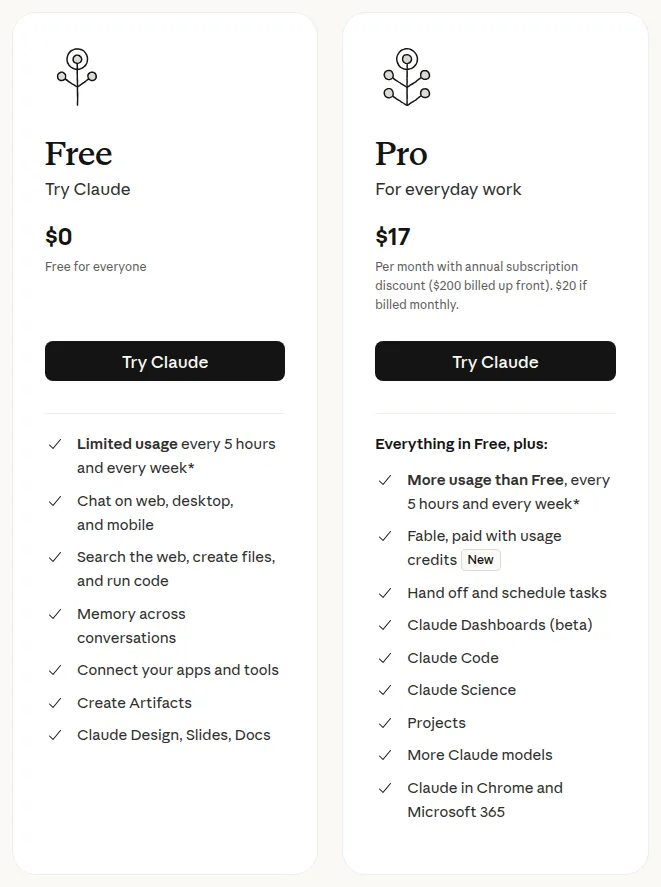
Screenshot: the Free and Pro plan cards on Anthropic’s pricing page at claude.com/pricing. Pro is $17 a month billed annually ($200 up front) or $20 billed monthly, and lists Claude Code. Captured by Universal Digital Assistant on November 2, 2026.
Privacy and business use
For confidential work, use a business plan rather than a personal account. Both vendors’ business and enterprise plans add admin controls, single sign-on and different data-handling terms from consumer plans. Check the current terms with your IT team before rolling either out.
Which should you choose?
If you want one assistant that does a bit of everything — including images and voice — choose ChatGPT. If your days are spent in long documents, careful writing or code, choose Claude. Many professionals keep both: the free tier of one alongside a paid plan for the other.
For Google’s assistant, read Gemini vs ChatGPT, Claude vs Gemini or the three-way ChatGPT vs Claude vs Gemini, or start from our guide to choosing an AI assistant. Other ChatGPT alternatives are covered in Perplexity vs ChatGPT, Copilot vs ChatGPT and Grok vs ChatGPT, and our ChatGPT Go vs Plus guide helps you pick a plan.
Verdict: who should choose which
Choose ChatGPT if…
- You want one assistant for writing, research, images and voice
- You regularly create images or talk to the assistant hands-free
- Your organisation is standardising on OpenAI's Business or Enterprise plans
Choose Claude if…
- You work with long reports, contracts, transcripts or research papers
- Precise editing and following detailed style instructions matter most
- You write software and want Claude Code in your terminal and IDE
Frequently asked questions
Is Claude better than ChatGPT?
It depends on the work. Claude is the stronger pick for long documents, careful writing and coding workflows. ChatGPT is the better all-in-one assistant thanks to built-in image generation, a mature voice mode and agent features. Test both free tiers on your own tasks.
Is ChatGPT or Claude cheaper?
At the main tier they cost the same. ChatGPT Plus and Claude Pro are both $20 a month in the US, and Claude Pro drops to $17 a month when billed annually. Both also have free tiers.
Which is better for coding, ChatGPT or Claude?
Both write and debug code well. Claude's advantage is Claude Code, included from the Pro plan, which works directly in your terminal and IDE. ChatGPT subscribers can use OpenAI's Codex. The most reliable test is a real task in your own repository.
Can Claude search the web like ChatGPT?
Yes. Both can search the web and cite their sources, and both offer research modes that investigate a question across many pages and return a structured report.
Can I use my ChatGPT history in Claude?
Not directly. Each assistant keeps its own conversation history. You can export your ChatGPT data from its settings and paste relevant context, or add documents to a Claude project, to carry work across.
Sources
Product facts are checked against the vendor's own announcements and documentation.
- ChatGPT pricing — OpenAIhttps://openai.com/chatgpt/pricing/
- GPT-6 Astra — A new generation of intelligence — OpenAIhttps://openai.com/index/gpt-6-astra/
- Claude plans & pricing — Anthropichttps://claude.com/pricing
- Anthropic newsroom — Anthropichttps://www.anthropic.com/news


