Comparison · AI Assistants
Copilot vs ChatGPT: which AI assistant should you use in 2026?
Microsoft Copilot vs ChatGPT compared on Windows and Microsoft 365, AI models, free plans, agents, work accounts and price — and when you need both.

The short answer
Choose Copilot if you work in Windows and Microsoft 365: it is built into Word, Excel, PowerPoint and Outlook and comes with Microsoft 365 Personal from $9.99 a month. Choose ChatGPT if you want a standalone assistant with OpenAI's latest models, memory, projects and plugins, from $8 (Go) or $20 (Plus) a month. Both have free apps with usage limits.
| Feature | Microsoft Copilot | ChatGPT |
|---|---|---|
| Made by | Microsoft | OpenAI |
| First released | February 2023 (as Bing Chat) | November 2022 |
| Models | Chosen by Microsoft, including OpenAI's GPT-5.6 family in Microsoft 365 Copilot | OpenAI's GPT-5.6 family; GPT-6 Astra on paid plans |
| Free plan | Copilot app, with usage limits | Unlimited everyday text chats with GPT-5.6 Luna; tools limited |
| Paid plans for individuals (US, per month) | Microsoft 365 Personal $9.99 · Family $12.99 · Premium $19.99 · Pro $99.99 | Go $8 · Plus $20 · Pro $100 or $200 |
| In Office apps | Built into Word, Excel, PowerPoint, OneNote and Outlook (with Microsoft 365) | Add-ins for Excel, Word and PowerPoint, plus a separate one for Google Sheets (limited use on Free and Go) |
| On Windows | Copilot key or Windows key + C; built into Edge | ChatGPT desktop app |
| Agents | Agentic research and analysis on Premium and Pro; Researcher and Analyst agents for businesses | ChatGPT Work (limited on Free and Go) |
| For businesses | Microsoft 365 Copilot, with enterprise data protection | ChatGPT Business and Enterprise |
Copilot and ChatGPT are easy to mix up. Microsoft uses OpenAI’s models in its Copilot products, and both assistants write, summarise, search the web, create images and talk back. But they are separate products with different plans and very different strengths. Microsoft Copilot is woven into Windows, Edge and the Microsoft 365 apps. ChatGPT is OpenAI’s standalone assistant that works the same way wherever you use it.
Inside Word, Excel, PowerPoint and Outlook
This is Copilot’s biggest advantage. With a Microsoft 365 subscription, Copilot works inside the apps where your documents already are: it drafts and rewrites in Word, analyses data in Excel, builds presentations in PowerPoint and summarises email in Outlook. There’s nothing to copy and paste, and it works on the file in front of you.
ChatGPT has its own add-in for Excel, Word and PowerPoint, plus a separate one for Google Sheets. Word joined on September 17, 2026, and all three are available on every ChatGPT plan, including Free, with limited usage on Free and Go and your plan’s agentic usage limit on Plus and Pro. Our tutorial on ChatGPT for Excel, Word and PowerPoint covers setup and limits. Outlook is different: ChatGPT reaches your mail through an Outlook Email app that searches and retrieves messages, with drafting done in the chat (see the best AI email assistants). If Word and Outlook are open all day, Copilot saves the most clicks.
On Windows and in Edge
On Windows 11 PCs, Copilot is one keypress away: press the Copilot key, or Windows key + C on keyboards without one. The Windows app can also find files on your PC, answer questions about what’s on your screen with Copilot Vision, and respond to “Hey Copilot” if you turn on the wake word. In Microsoft Edge, Copilot can summarise the page, video or PDF you’re viewing.
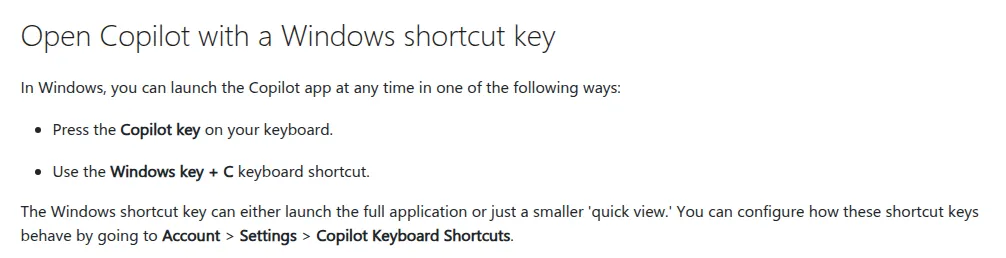
Screenshot: the shortcut-key section of Microsoft Support’s “Access Microsoft Copilot on Windows” page. Captured by Universal Digital Assistant on November 2, 2026.
ChatGPT has its own desktop apps for Windows and Mac, and works the same way on any browser or phone. That makes it the better fit if you switch between a Windows PC, a Mac and an Android phone, or if you don’t use Edge.
If Copilot keeps getting in your way, our guide explains how to turn off Copilot in Windows, Edge and each Office app.
Models and answers
ChatGPT runs on OpenAI’s newest models: GPT-5.6 Luna on the Free and Go plans, GPT-5.6 Sol with adjustable thinking on Plus, and GPT-6 Pro, powered by GPT-6 Astra, on Pro.
Copilot uses models Microsoft selects for each experience. Microsoft 365 Copilot added OpenAI’s GPT-5.6 family in 2026, and business plans offer a choice of models. In practice, answer quality is close for everyday tasks, so the deciding factor is usually where the assistant lives rather than the model underneath.
Free plans and usage limits
Both have free apps for the web, Windows, Mac, iPhone and Android. ChatGPT’s free plan gives unlimited everyday text chats, with limits on uploads, images and deep research. Copilot’s free app is subject to available capacity; when you hit a limit, you can wait or upgrade.
The catch with Copilot is that its best features — Copilot inside Word, Excel, PowerPoint and Outlook — need a Microsoft 365 subscription. On Microsoft 365 Family, family members share the apps and storage, but only the subscription owner gets Copilot.
Agents and bigger tasks
ChatGPT Work is OpenAI’s agent for multi-step jobs: it gathers context, proposes a plan, then produces documents, spreadsheets, presentations or reports, using apps you connect. It is limited to the desktop app on Free and Go and available everywhere from Plus.
Copilot includes agentic features for advanced research and analysis on Microsoft 365 Premium and Pro. Businesses with Microsoft 365 Copilot get prebuilt agents such as Researcher and Analyst, which work across company data.
Work accounts and privacy
At work, the choice is often made for you. Microsoft 365 Copilot works with the emails, chats and documents each employee already has permission to see, under Microsoft’s enterprise data protection commitments, and IT teams manage it with the same tools they use for the rest of Microsoft 365.
ChatGPT Business and Enterprise add single sign-on, admin controls and compliance features, and ChatGPT can connect to work tools through apps. For confidential work, use the plan your organisation has approved rather than a personal account.
Price
| Plan level | Microsoft Copilot | ChatGPT |
|---|---|---|
| Free | Copilot app, with usage limits | Unlimited everyday text chats, tools limited |
| Entry | Microsoft 365 Personal, $9.99 a month | Go, $8 a month |
| Main plan | Microsoft 365 Premium, $19.99 a month | Plus, $20 a month |
| Heavy use | Microsoft 365 Pro, $99.99 a month | Pro, $100 or $200 a month |
Microsoft’s plans also include the Office apps, 1 TB of OneDrive storage per person and security features, so compare them with what you already pay for. If you already pay for Microsoft 365 Personal or Family, you already have Copilot in the apps — on Family, for the subscription owner.
Which should you choose?
If your work happens in Word, Excel, PowerPoint and Outlook — or your employer provides Microsoft 365 Copilot — choose Copilot. If you want a flexible assistant that works the same everywhere, with memory, projects, plugins and agents, choose ChatGPT. Plenty of people use both: Copilot inside Office, ChatGPT for everything else.
Comparing more assistants? See Grok vs ChatGPT, Perplexity vs ChatGPT and Gemini vs ChatGPT, or start with our guide to choosing an AI assistant.
Verdict: who should choose which
Choose Microsoft Copilot if…
- You write documents, spreadsheets and email in Word, Excel and Outlook
- You already pay for Microsoft 365 Personal, Family or Premium
- Your employer provides Microsoft 365 Copilot for work data
Choose ChatGPT if…
- You want the same assistant on any device, whichever apps you use
- You want memory, projects and plugins that carry context between chats
- Your documents and email live in Google or other non-Microsoft tools
Frequently asked questions
Is Copilot better than ChatGPT?
Copilot is better inside Microsoft's apps — it can draft in Word, analyse data in Excel and summarise email in Outlook without you copying anything across. ChatGPT is the stronger standalone assistant, with more tools for projects, plugins and long-running tasks. The right choice depends on where you work.
Do I need ChatGPT if I have Copilot?
Not necessarily. If most of your work happens in Word, Excel, PowerPoint and Outlook, Copilot covers everyday writing, summaries and analysis. ChatGPT is worth adding if you want its memory, projects, plugins or agents, or if you work outside Microsoft 365.
Is Copilot actually free?
The Copilot app is free on the web, Windows, Mac, iPhone and Android, with usage limits that depend on available capacity. Copilot inside Word, Excel, PowerPoint and Outlook needs a Microsoft 365 Personal, Family, Premium or Pro subscription, and only the subscription owner gets the AI features.
Why do companies prefer Copilot over ChatGPT?
Companies that already run on Microsoft 365 can add Copilot to the apps and security controls they use. Microsoft 365 Copilot works with the email, chats and documents each employee already has permission to see, under enterprise data protection. ChatGPT Business and Enterprise have admin controls too, but work alongside those tools rather than inside them.
What are the disadvantages of Copilot?
Its most useful features need a Microsoft 365 subscription, Family plans give AI features only to the owner, and it appears in many places — Windows, Edge and the Office apps — which some people find intrusive. You can turn it off app by app.
Does Copilot use ChatGPT?
Copilot doesn't use the ChatGPT app, but Microsoft uses OpenAI's models among others. Microsoft 365 Copilot added OpenAI's GPT-5.6 family in 2026.
Sources
Product facts are checked against the vendor's own announcements and documentation.
- Copilot pricing plans for individuals — Microsofthttps://www.microsoft.com/en-us/microsoft-365-copilot/pricing/individuals
- Microsoft 365 Copilot plans and pricing for business — Microsofthttps://www.microsoft.com/en-us/microsoft-365-copilot/pricing
- Available today: OpenAI's GPT-5.6 in Microsoft 365 Copilot — Microsofthttps://techcommunity.microsoft.com/blog/microsoft365copilotblog/available-today-openai%E2%80%99s-gpt-5-6-in-microsoft-365-copilot/4533152
- Access Microsoft Copilot on Windows — Microsofthttps://support.microsoft.com/en-us/microsoft-365-copilot/access-microsoft-365-copilot-on-windows
- Updated Windows and Microsoft Copilot Chat experience — Microsofthttps://learn.microsoft.com/en-us/windows/client-management/manage-windows-copilot
- ChatGPT pricing — OpenAIhttps://chatgpt.com/pricing/
- GPT-5.6 and GPT-6 Pro in ChatGPT — OpenAIhttps://help.openai.com/en/articles/20001354-gpt-56-in-chatgpt


