Guide · AI Assistants
Microsoft Copilot review 2026: free app, Copilot in Word and Excel, Vision, plans, pros, cons and who it suits
Our Microsoft Copilot review covers the free app, conversation modes, Vision, connectors and Copilot in Word and Excel, plus Microsoft 365 pricing, pros and cons.

The short answer
Microsoft Copilot is the AI assistant to pick if you work in Windows, Word, Excel, PowerPoint and Outlook. The Copilot app is free with usage limits. Copilot inside the Office apps needs Microsoft 365 Personal ($9.99 a month), Family ($12.99), Premium ($19.99) or Pro ($99.99). Premium is the best fit for heavy users, while the free app is fine for everyday questions.
Microsoft Copilot is Microsoft’s AI assistant. It started as Bing Chat in February 2023, and today it is a free app for the web, Windows, Mac, iPhone and Android as well as a set of features built into Word, Excel, PowerPoint, Outlook, OneNote and the Edge browser. This review covers what Copilot can do, what the plans cost, where it is strong and weak, and who should use it. It is based on Microsoft’s US pricing page, Microsoft Support articles and Microsoft’s blog as of October 2026. We have not run extended hands-on tests of every plan.
Microsoft Copilot at a glance
| Microsoft Copilot | |
|---|---|
| What it is | Microsoft’s AI assistant, as an app and inside Microsoft 365 |
| Made by | Microsoft; launched as Bing Chat in February 2023, renamed Copilot in November 2023 |
| Platforms | Web, Windows, macOS, iOS and Android; Edge; Word, Excel, PowerPoint, Outlook, OneNote and Teams |
| Free plan | Yes, with usage limits |
| Paid plans (US) | Microsoft 365 Personal $9.99, Family $12.99, Premium $19.99, Pro $99.99 a month |
| Models | Chosen by Microsoft, including OpenAI models |
| Best for | People who work in Windows and Microsoft 365 |
What Microsoft Copilot can do
- Chat with conversation modes. Microsoft’s help page lists five modes: Quick response for instant answers, Think Deeper (which takes up to 10 seconds and uses OpenAI’s latest reasoning models), Study and learn for guided explanations and quizzes, Smart (which uses OpenAI’s GPT-5 and decides how long to think), and Search for up-to-date web answers with citations. You pick a mode from the Quick response menu under your prompt. Some modes need you to sign in.
- Copilot in the Office apps. With Microsoft 365, Copilot works inside Word, Excel, PowerPoint, Outlook and OneNote, where it can draft documents, analyze data, build presentations and summarize email. Microsoft says it also works across apps, for example turning a file into a Word document or a PowerPoint deck.
- Voice and Vision. You can talk to Copilot, and during a voice conversation, Vision lets you share your desktop screen or your phone’s camera and ask about what Copilot sees. Microsoft notes that Vision explains but doesn’t act: it may highlight parts of the screen, but it won’t click, type or scroll. On Windows, voice starts from the Copilot key or Windows key + C.
- Connectors. Signed in with a personal Microsoft account, Copilot can connect to OneDrive, Outlook.com, Google Drive, Gmail, Google Calendar and Google Contacts, so you can ask it to find a file, an email or tomorrow’s appointments. Connectors work on Copilot.com and the mobile apps.
- Browse with Copilot in Edge. An experimental agent that clicks, types and moves between tabs in Edge for you, while you watch. Microsoft says it is rolling out to Microsoft 365 Premium subscribers in the US first, and it warns about prompt injection and advises against using it for banking or sensitive data. Our best AI browsers guide compares it with rivals.
- Images and audio. All paid plans list AI image creation and AI-generated audio (English only), with higher usage than the free app.
- Agentic AI on Premium and Pro. Microsoft 365 Premium includes limited use of “agentic AI that gets things done for you including advanced research and analytics,” and Pro the highest use.
Getting started
Microsoft’s help pages describe a few steps worth knowing on day one:
- Choose a mode before you send. Select Quick response under the prompt box and switch to Think Deeper, Smart, Study and learn or Search. The mode stays on for follow-up questions until you change it.
- Turn on connectors. On Copilot.com, select the + icon and Use connectors. In the mobile app, go to your Profile, then Connectors, and select Connect next to a service. Your Microsoft account must match the one you use for OneDrive or Outlook.
- Start Vision from a voice chat. Begin a voice conversation, then select the screen share arrow on desktop or the camera icon on mobile. Stop sharing ends Vision but not the voice chat.
- Bring your context with you. Copilot can’t import chat history or memory from other AI tools. Microsoft suggests exporting what matters, uploading it or saving it in OneDrive, Word or OneNote, and asking Copilot to summarize it into a profile.
What’s coming
On September 25, 2026, Microsoft announced a redesigned Copilot with Home, where Chat and Cowork (for delegated, multi-step work) come together, Office in Copilot, which builds Word, Excel and PowerPoint into the app, Code, for building small apps and dashboards from a description, and Autopilot, an agent that keeps working in the background. These features are aimed at work accounts and are rolling out through Microsoft’s Frontier early-access program first. Microsoft says Code will be in preview for Microsoft 365 Premium and Pro subscribers later this year. Home users can also join the Frontier program for early access to experimental Copilot features, which Microsoft warns may change or be removed.
What Microsoft Copilot costs
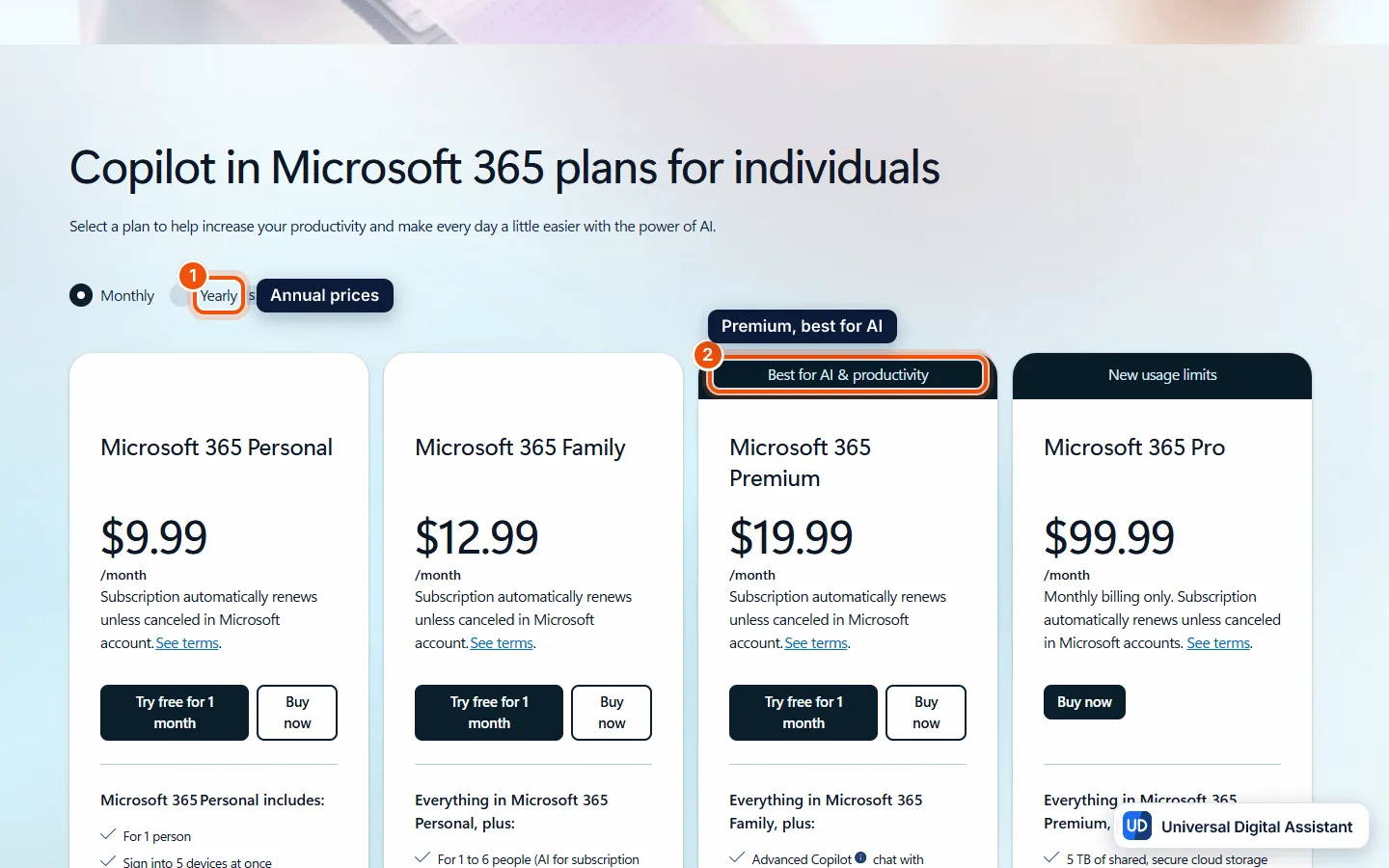
Screenshot: Microsoft’s US pricing page for individuals, monthly prices shown: Personal $9.99, Family $12.99, Premium $19.99 and Pro $99.99. Switch to yearly billing (1) to save up to 17%; Premium (2) is the plan Microsoft labels best for AI. Captured by Universal Digital Assistant on October 20, 2026.
| Plan | Price (US) | People | Copilot usage | Storage |
|---|---|---|---|---|
| Copilot app | Free | 1 | Limited | — |
| Microsoft 365 Personal | $9.99 a month or $99.99 a year | 1 | Higher than free | 1 TB |
| Microsoft 365 Family | $12.99 a month or $129.99 a year | Up to 6 (Copilot for the owner only) | Higher than free | 2 TB shared |
| Microsoft 365 Premium | $19.99 a month or $199.99 a year | Up to 6 (Copilot for the owner only) | Extensive, plus limited agentic AI | 2 TB shared |
| Microsoft 365 Pro | $99.99 a month, monthly billing only | Up to 6 (Copilot for the owner only) | Highest | 5 TB shared |
Microsoft says yearly billing saves up to 17%, and Personal, Family and Premium come with a one-month free trial. Personal and Family include AI credits and feature limits, and when you use them up a feature may stop working until your allowance resets. You can check your remaining credits in your Microsoft account under Services & subscriptions. Premium also unlocks Copilot features Microsoft keeps exclusive to Premium and Pro.
The old standalone Copilot Pro plan is gone, replaced by Premium. Businesses buy Microsoft 365 Copilot under separate business and enterprise plans. Our Microsoft Copilot plans explained guide covers both.
Pros
- Built into the tools many people already use. Windows, Edge, Word, Excel, PowerPoint and Outlook all have Copilot in the same place.
- A useful free app. Chat is free within limits, Study and learn is open to all Copilot users, and Microsoft says Think Deeper isn’t capped, though subscribers get priority when capacity is tight.
- Good value if you already pay for Microsoft 365. Personal and Family include Copilot in the Office apps alongside storage, Defender and the apps themselves.
- Connectors for Google too. Copilot can search Gmail, Google Drive and Google Calendar as well as Outlook.com and OneDrive.
- Clear safety guidance. Microsoft’s help pages explain plainly what Vision and Browse with Copilot can and can’t do.
Cons
- Copilot isn’t shared on Family plans. Only the subscription owner gets Copilot features, even on Premium and Pro.
- Vague limits. Microsoft describes usage as “higher than free,” “extensive” and “highest” rather than publishing numbers.
- Confusing product names. Copilot, Microsoft 365 Copilot, Copilot Chat and GitHub Copilot are different products with different plans.
- Some features are paywalled or US-first. Vision needs a Microsoft 365 subscription on a personal account, and Browse with Copilot is reaching US Premium subscribers first.
- The newest features target business first. Home, Cowork, Code and Autopilot are reaching work accounts and the Frontier program before home users.
Who should use Microsoft Copilot?
Choose Copilot if you already work in Windows and Microsoft 365, or if you want AI inside Word, Excel and Outlook rather than in a separate chat window. Try the free app first, then pick Personal or Family for Copilot in the Office apps, or Premium if you hit the limits. If you live in Google’s apps instead, read our Gemini review, and for a standalone assistant with a wider ecosystem, see the ChatGPT review and the Claude review. Compare directly in Copilot vs ChatGPT, see the Copilot profile for product facts, and read how to turn off Copilot if you’d rather not use it.
Frequently asked questions
Is Microsoft Copilot free?
Yes. Microsoft offers a limited free version of Copilot on the web, Windows, Mac, iPhone and Android, subject to capacity and usage limits. Copilot inside Word, Excel, PowerPoint and Outlook needs an eligible Microsoft 365 subscription.
How much does Microsoft Copilot cost?
As of October 2026, Microsoft's US page lists Microsoft 365 Personal at $9.99 a month ($99.99 a year), Family at $12.99 ($129.99 a year), Premium at $19.99 ($199.99 a year) and Pro at $99.99 a month, billed monthly only. Personal, Family and Premium offer a one-month free trial.
Can my family use Copilot on Microsoft 365 Family?
Family members share the apps and storage, but Microsoft says Copilot features in Word, Excel, PowerPoint and Outlook are only available to the subscription owner. Other family members need their own eligible subscription.
What is Copilot Vision?
Vision lets Copilot see your desktop screen or your phone's camera during a voice conversation and answer questions about it. It doesn't click, type or scroll for you. On a personal account it needs Microsoft 365 Personal, Family or Premium, according to Microsoft's help page.
Which AI models does Copilot use?
Microsoft says Copilot uses AI models it selects. Its help page says Think Deeper is powered by OpenAI's latest reasoning models and that Smart mode uses OpenAI's GPT-5. Microsoft can change the models over time.
What happened to Copilot Pro?
The standalone $20 Copilot Pro subscription is retired. Microsoft stopped selling it to new customers in October 2025 and moved its features into Microsoft 365 Premium. Our Microsoft Copilot plans guide explains the change.
Can I turn Copilot off?
Yes. You can uninstall the Copilot app on Windows 11 and switch off Copilot in Word, Excel, PowerPoint, OneNote and Outlook. Our guide on how to turn off Copilot has the steps.
Sources
Product facts are checked against the vendor's own announcements and documentation.
- Copilot pricing plans for individuals — Microsofthttps://www.microsoft.com/en-us/microsoft-365-copilot/pricing/individuals
- Conversation modes in Microsoft Copilot — Microsoft Supporthttps://support.microsoft.com/en-us/topic/conversation-modes-quick-response-think-deeper-deep-research-smart-575efe12-eb34-4437-885a-440f7623cffb
- Get started with vision in Microsoft Copilot — Microsoft Supporthttps://support.microsoft.com/en-us/topic/using-copilot-vision-with-microsoft-copilot-3c67686f-fa97-40f6-8a3e-0e45265d425f
- Connect Microsoft Copilot to other services with connectors — Microsoft Supporthttps://support.microsoft.com/en-us/microsoft-copilot/connecting-microsoft-copilot-to-other-services
- Browse with Copilot in Microsoft Edge — Microsoft Supporthttps://support.microsoft.com/en-us/microsoft-copilot/browse-with-copilot
- Introducing the new Copilot with Home, Code and Autopilot — Microsofthttps://blogs.microsoft.com/blog/2026/09/25/introducing-the-new-copilot-with-home-code-and-autopilot/


