Guide · AI Assistants
Gemini review 2026: Gemini 4 Argon, tasks, Deep Research, plans, pros, cons and who it suits
Our Gemini review covers Gemini 4 Argon, tasks, Deep Research, Gemini Live and Google app links, plus Free, AI Plus, Pro and Ultra pricing, pros and cons.

The short answer
Gemini is Google's AI assistant and the best choice if you live in Gmail, Docs, Drive and Android. The free plan is generous but runs mainly on the Flash-Lite model with a 32K-token context window. Google AI Pro, at $19.99 a month, is the plan most people should consider: it adds Gemini 4 Argon, tasks, a 1M-token context window and 5 TB of storage.
Gemini is Google’s AI assistant. It runs as an app on the web, Android, iPhone, Mac and Windows, and it is built into Gmail, Docs, Chrome and Google Home. October 2026 brought its biggest update of the year, Gemini 4 Argon, plus a switch that lets Gemini work on tasks while you’re away. This review covers what Gemini can do, what each plan costs, its strengths and weaknesses, and who should use it. It is based on Google’s subscription page, the Gemini Apps Help center and Google’s launch posts as of October 2026. We have not run extended hands-on tests of the paid plans.
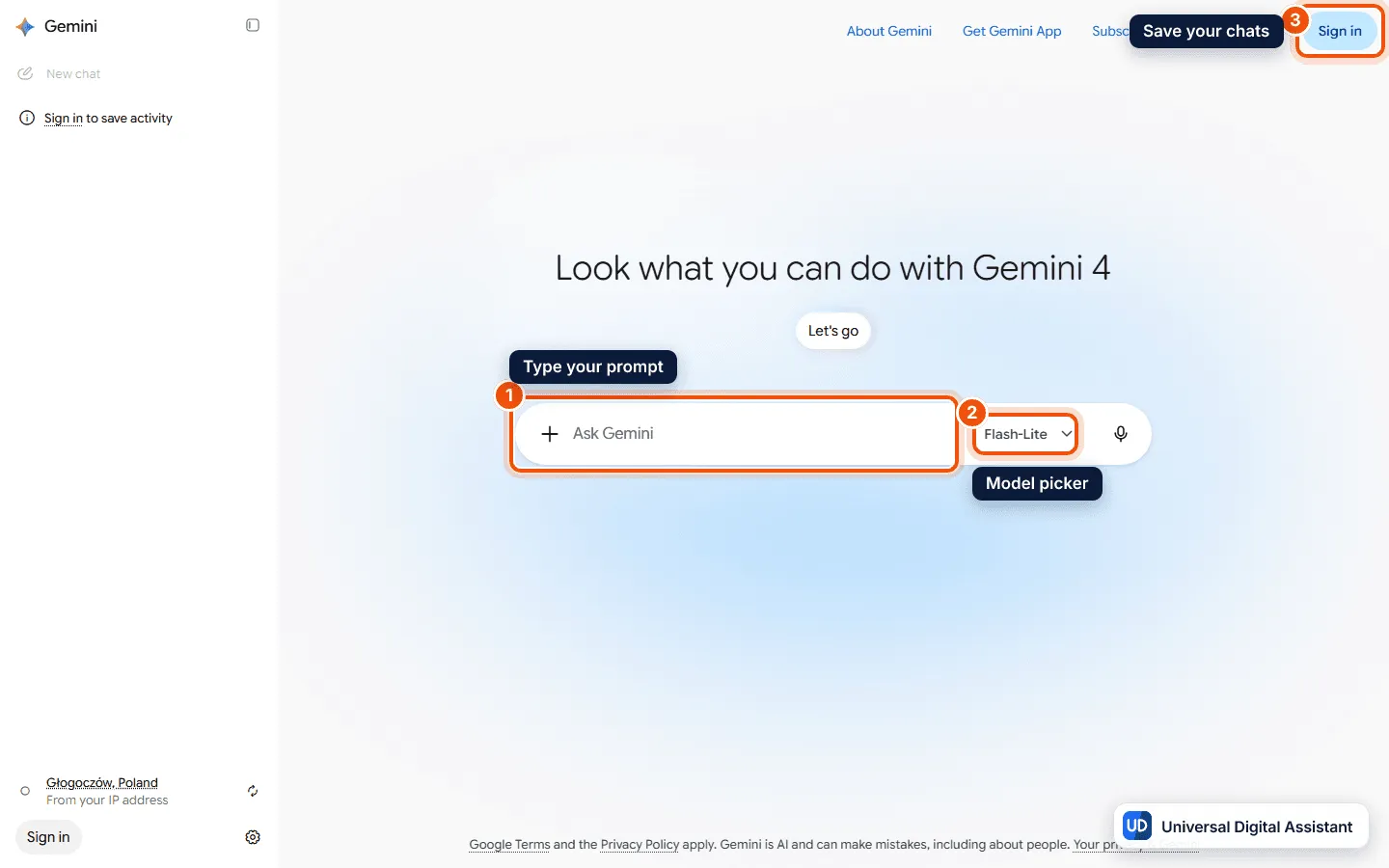
Screenshot: The Gemini web app at gemini.google.com, signed out. Type a prompt in the Ask Gemini box (1); the model picker (2) shows Flash-Lite, the model free users get, and signing in (3) saves your chats. Captured by Universal Digital Assistant on October 17, 2026.
Gemini at a glance
| Gemini | |
|---|---|
| What it is | Google’s AI assistant and chatbot |
| Made by | Google; launched as Bard in March 2023, renamed Gemini in February 2024 |
| Platforms | Web, Android, iOS, macOS and Windows apps; built into Gmail, Docs, Chrome and Google Home |
| Models | Flash-Lite, Flash, Pro and Gemini 4 Argon, depending on plan |
| Free plan | Yes, Flash-Lite with standard limits and a 32K-token context window |
| Paid plans (US) | AI Plus $4.99; AI Pro $19.99; AI Ultra $99.99 or $199.99 a month |
| Best for | People who use Google’s apps and Android every day |
What Gemini can do
- Four models with a picker. Google’s help center describes Flash-Lite for quick everyday answers, Flash as a balanced model, Pro for complex prompts and coding, and Gemini 4 Argon for “top-tier intelligence” and deep reasoning. With auto model selection on, Gemini chooses for you, and most prompts use Flash-Lite. Subscribers can switch models manually and set the thinking level to Low, Medium or High. Our Gemini 4 Argon report covers the new model.
- Chat or tasks. Since October 13, a toggle in the main chat window switches from chat to tasks. Google says that when you choose tasks, Gemini can work for you “even when you’re not at your computer.” Tasks are listed for Google AI Pro and Ultra only, using Flash or Argon. Our guide to Gemini Spark explains Google’s agent for tasks and schedules.
- Connected apps. Gemini links to Google services such as Gmail, Docs, Maps and YouTube, and Google says it now connects to more than 40 outside apps, including Instacart, OpenTable, Adobe and Shopify.
- Deep Research. Gemini runs many searches and reasoning passes and turns them into a report. It’s on every plan, though Google warns it uses more of your allowance and may be unavailable to free users at busy times. Our deep research tools comparison puts it beside its rivals.
- Gemini Live. A spoken back-and-forth conversation on your phone. See how to use Gemini Live.
- Images, video and music. Image generation with Nano Banana 2 is on every plan, music generation too. Video generation and redoing images with Nano Banana Pro start at AI Plus.
- Canvas, skills and study tools. Canvas for writing and code, skills (which are replacing Gems, see Gemini skills replace Gems), Storybook, quizzes and flashcards, Audio Overviews and slide generation are listed for every plan.
- Gemini Notebook. Google’s research notebook, formerly NotebookLM, is part of the plans. Our Gemini Notebook guide covers it.
- Desktop apps. Gemini has Mac and Windows apps, and Google has added Antigravity’s coding interface to the Mac app. See the Gemini app for Windows and Mac.
Context windows
The context window decides how much text Gemini can read at once, and it differs a lot by plan. Google’s help center lists:
| Plan | Context window |
|---|---|
| Free | 32K tokens |
| AI Plus | 128K tokens |
| AI Pro and Ultra | 1 million tokens |
Google says 1 million tokens is about 1,500 pages of text or 30,000 lines of code, so long documents and codebases need Pro or Ultra.
What Argon changes
Google says Gemini 4 Argon answers more directly with less hedging, avoids repeating itself and skips clichés, and that on longer tasks it shares its progress more often. It is the model behind tasks on Pro and Ultra, alongside Flash. Google publishes no fixed prompt allowance for Argon on consumer plans, and its help center notes that more advanced models and higher thinking levels use more of your limit, so expect to run out sooner if you leave Argon on High for everything.
How the limits feel in practice
Google’s help center ranks prompts by how much of your allowance they use. A short one-off request, such as writing an email subject line, costs very little. Long conversations and large files cost more, because Gemini re-reads the history or the document each time. Deep Research and media generation cost the most, with video generally the heaviest. Google’s own tip is to start a new chat when you change topic. Gemini warns you when you’re close to a limit and tells you when it will refresh.
What Gemini costs
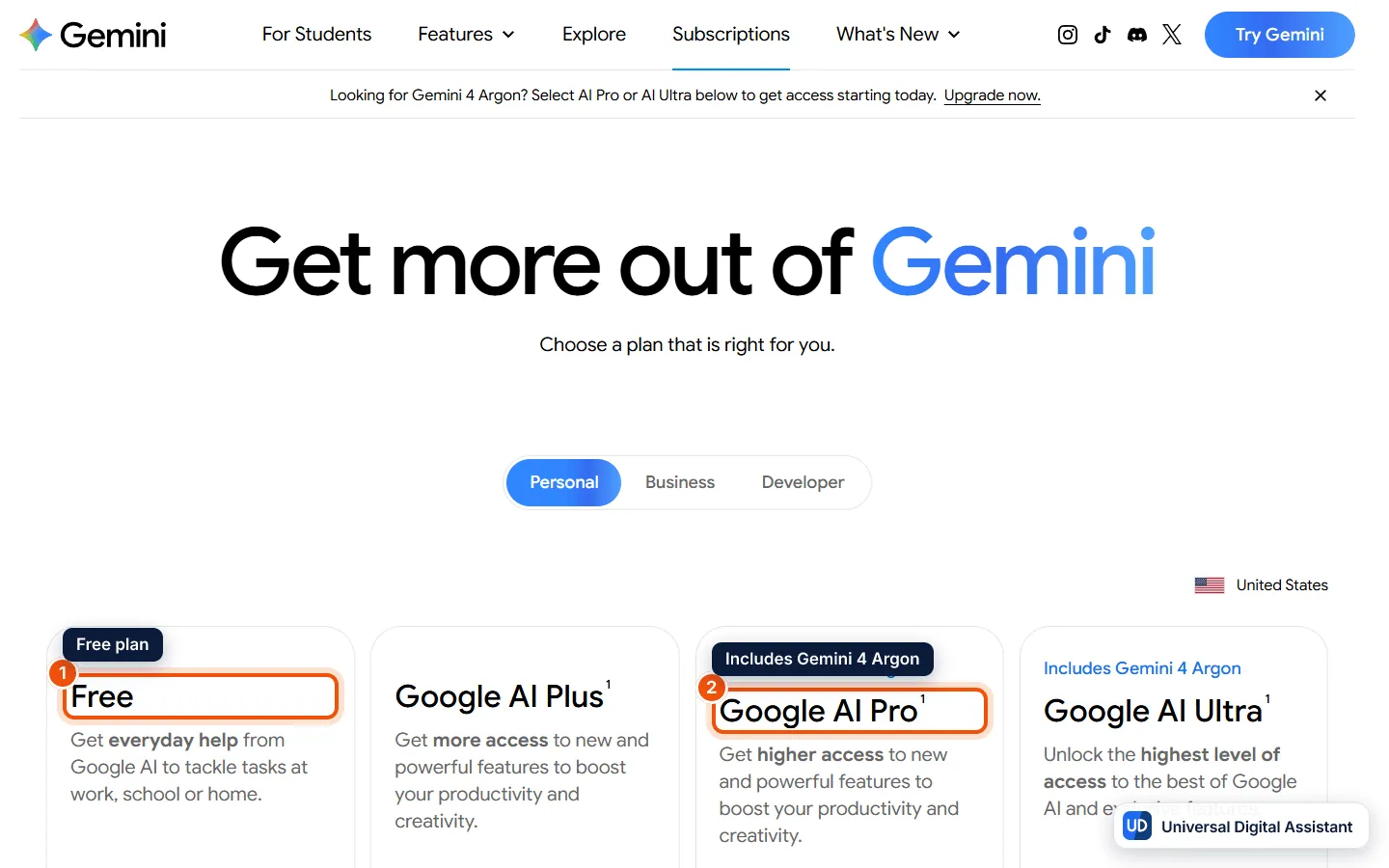
Screenshot: Google’s US subscriptions page with the Free, Google AI Plus, Google AI Pro and Google AI Ultra plans side by side. Gemini 4 Argon starts at Google AI Pro (2). Captured by Universal Digital Assistant on October 20, 2026.
| Plan | Price (US) | Gemini usage | Models | Storage |
|---|---|---|---|---|
| Free | $0 | Standard limits | Flash-Lite (auto may use Flash or Pro) | 15 GB |
| Google AI Plus | $4.99 a month | 2x Free | Flash-Lite, Flash, Pro | 400 GB |
| Google AI Pro | $19.99 a month | 4x Free | Adds Gemini 4 Argon | 5 TB |
| Google AI Ultra | $99.99 (5x Pro) or $199.99 (20x Pro) a month | Up to 20x Pro | Highest access to Argon | From 20 TB |
The plans bundle much more than chat. Google’s page lists 200 Google Flow credits for video on AI Plus, 1,000 on Pro and 10,000 or 25,000 on Ultra. Pro adds Chrome auto browse, Google Home Premium Standard, YouTube Premium Lite, Jules and entry access to Antigravity. Ultra adds Google Home Premium Advanced, Project Genie, a YouTube Premium individual plan and first access to features in select countries. Our Google AI Plus vs Pro vs Ultra guide compares every perk.
Limits are compute-based: Google says they refresh every 5 hours until you reach a weekly limit, and you can buy AI credits to extend them. You can check where you stand under Settings, then Usage limits, in the web app. Google AI plans are for adults 18 and over in the US, and you can cancel at any time. For businesses, Gemini Enterprise starts at $21 per seat per month for the Business edition and $30 for Standard and Plus.
Pros
- The deepest Google integration. Gmail, Docs, Drive, Maps, Chrome, Android and Google Home all tie into one assistant.
- A broad free plan. Deep Research, Gemini Live, Canvas, skills, image and music generation are all free, within limits.
- Strong value in AI Pro. For $19.99 you get Argon, tasks, a 1M-token context window and 5 TB of storage, which many people would otherwise pay for separately.
- A cheap entry tier. AI Plus at $4.99 doubles the free limits and adds video generation and 400 GB of storage.
- Clear model control. Subscribers can pick the model and the thinking level, and see which model answered.
Cons
- The free plan uses a small model. Free users mostly get Flash-Lite with a 32K context window, so long files and hard reasoning feel limited unless you pay.
- No published message counts. Google expresses limits as multiples (2x, 4x, 20x) rather than numbers, so it is hard to know how far a plan goes.
- Feature availability varies by country. Argon in AI Mode in Search, Project Genie and some Ultra features are limited to select countries.
- Lots of moving parts. Flow credits, skills, tasks, Spark, Notebook and Antigravity can be confusing, and names change often.
- Mixed messages from Google. Parts of Google’s own pages still refer to older models such as 3.1 Pro, so check the plan details before you buy.
Who should use Gemini?
Choose Gemini if your email, files and calendar already live with Google, if you use an Android phone, or if you want an AI plan that also covers cloud storage and other Google perks. Start on the free plan, and move to AI Pro when you need Argon, tasks or long documents. If you want the broadest app ecosystem, look at our ChatGPT review, and if long-form writing and coding matter most, read the Claude review. For side-by-side comparisons, see Gemini vs ChatGPT, Claude vs Gemini and ChatGPT vs Claude vs Gemini. For the product facts, see the Gemini profile, and if you would rather switch it off, read how to turn off Gemini.
Frequently asked questions
Is Gemini free?
Yes. The Gemini app is free with a Google Account. As of October 2026 the free plan includes the Flash-Lite model, image generation and editing, Deep Research, Gemini Live, Canvas, skills and 15 GB of storage, with standard usage limits and a 32K-token context window.
How much does Gemini cost?
In the US, Google AI Plus costs $4.99 a month, Google AI Pro $19.99 a month and Google AI Ultra $99.99 a month for 5x Pro's limits or $199.99 for 20x. Each plan also adds cloud storage and perks in other Google products.
Which Gemini plan includes Gemini 4 Argon?
Google AI Pro and Google AI Ultra. Google's help center lists Argon in both chats and tasks on those plans, while the free plan and AI Plus do not include it. Ultra gives the highest access.
What are Gemini's usage limits?
Google says limits are compute-based and depend on the prompt, the model and features you use and the length of the chat. They refresh every 5 hours until you reach a weekly limit. AI Plus gives 2x the standard limits, Pro 4x and Ultra 5x or 20x Pro's.
What happens when I hit the limit?
Google says that if you have a Google AI plan and reach your limit, the chat continues with Flash-Lite. Otherwise you can wait for the limit to refresh, upgrade, or extend limits by buying AI credits.
Is Gemini better than ChatGPT?
It depends on where you work. Gemini fits best if you use Google's apps and Android, and Google AI Pro bundles 5 TB of storage and other perks. ChatGPT has a broader third-party ecosystem. Our Gemini vs ChatGPT comparison goes through the differences.
Can businesses use Gemini?
Yes. Google sells Gemini Enterprise separately. Its Business edition starts at $21 per seat per month for teams of up to 300, and the Standard and Plus editions start at $30 per seat per month. Google says business data isn't used to train its models.
Sources
Product facts are checked against the vendor's own announcements and documentation.
- Google AI Plus, Pro and Ultra subscriptions — Googlehttps://gemini.google/us/subscriptions/
- Gemini Apps limits and feature availability — Gemini Apps Helphttps://support.google.com/gemini/answer/16275805
- About Gemini models — Gemini Apps Helphttps://support.google.com/gemini/answer/18648722
- Gemini 4 Argon is now available in the Gemini app — Googlehttps://blog.google/innovation-and-ai/products/gemini-app/gemini-4-argon-availability/


