Guide · Productivity
Cursor review 2026: the AI coding agent, its new X Subscription pricing, pros, cons and alternatives
Our Cursor review covers its coding agents, cloud agents, code review and team rules, the new X Subscription pricing from $8 to $200, pros, cons and alternatives.

The short answer
Cursor is an AI coding agent that runs in its own desktop editor, in a command-line tool, in the cloud and from Slack, GitHub and Linear. Its strengths are parallel subagents, cloud agents, built-in code review and team rules. Since October 12, 2026 new customers buy it through The X Subscription, from $8 a month, and third-party models such as Claude and GPT are billed separately at API list prices.
Cursor is one of the best-known AI coding agents, and as of October 12, 2026 it is sold as part of The X Subscription, alongside Grok and X Premium. This review covers what Cursor does, what it costs now, where it is strong, where it is weaker and who should choose it. It is based on Cursor’s own product and pricing pages and SpaceXAI’s announcements, and we haven’t run extended hands-on tests, so treat the strengths as what the vendor documents rather than our own measurements.
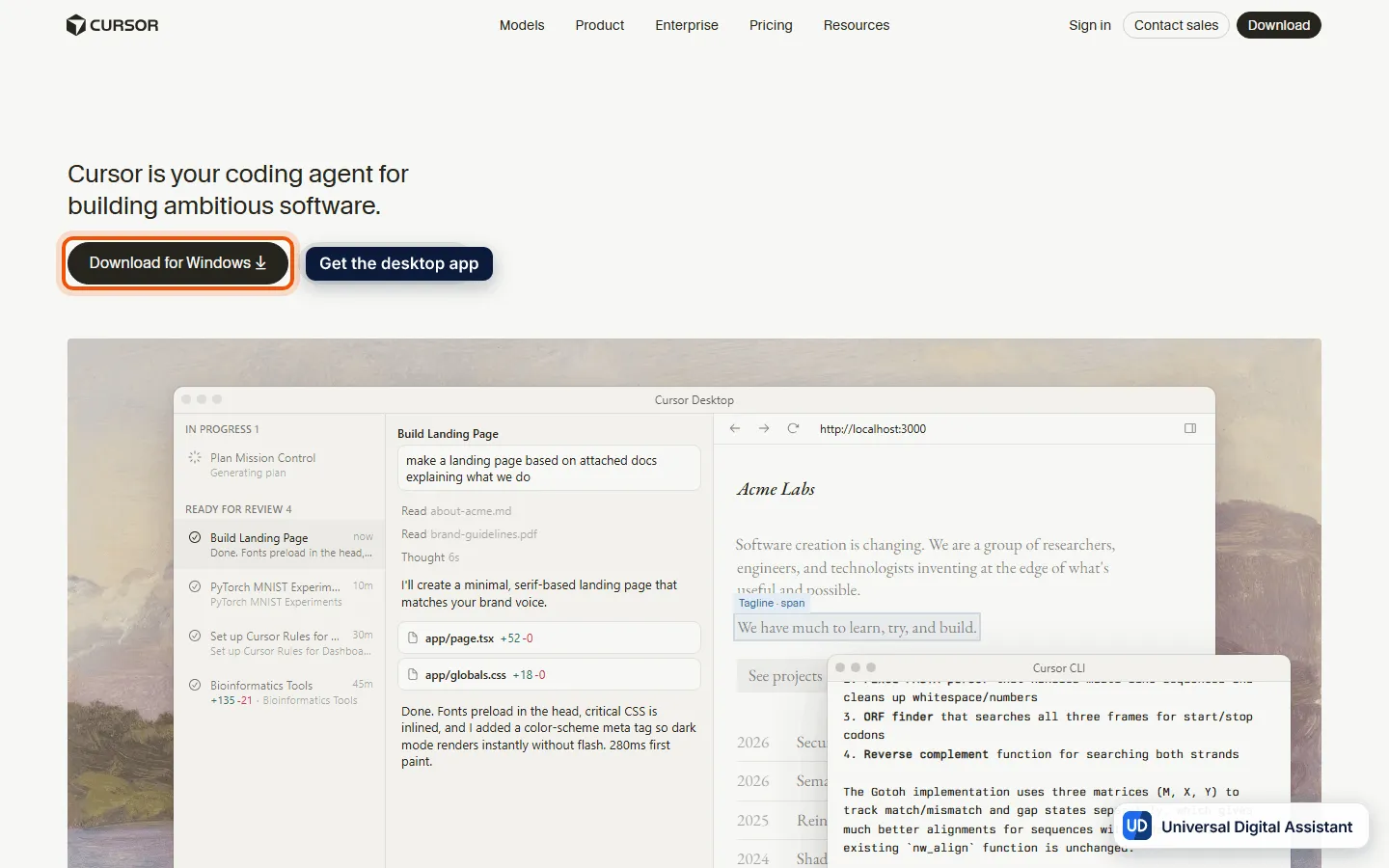
Screenshot: the Cursor website’s demo of Cursor Desktop and the Cursor CLI. Captured by Universal Digital Assistant on October 17, 2026.
Cursor at a glance
| Cursor | |
|---|---|
| What it is | A coding agent in its own desktop editor, a CLI, the cloud, web and mobile |
| Made by | Anysphere, now sold with Grok through SpaceXAI’s X Subscription |
| Platforms | macOS, Windows and Linux; web and mobile for cloud agents |
| Free plan | Yes, with limited agent and chat requests |
| Paid plans (US) | Plus $8, Premium $30, Super $100, Ultra $200 a month; Teams from $30 a user |
| Models | Grok models, including Grok 4.7, are included; third-party models are billed at API list price |
| Best for | Developers who want one editor with agents, review and team rules |
What Cursor can do
Cursor’s product page describes agents that “understand your entire codebase” and work wherever you do:
- Desktop, CLI, web and mobile. One agent runs across Cursor Desktop, the Cursor CLI (in any terminal, script or editor), cloud agents in a browser or on your phone, and tools such as GitHub, Slack, Linear and JetBrains IDEs.
- Parallel subagents with different models. Cursor says subagents run in parallel to explore your codebase, each using the best model for the task. Its demo shows tasks assigned to models from several labs at once.
- Plan, build, debug and design. For complex tasks Cursor asks clarifying questions, builds a plan, then executes in the background. Debug mode instruments your code and uses real execution data to find the fix, and design mode lets you select an element on a page and ask for a change.
- Real engineering tools. Cursor edits files, runs terminal commands (sandboxed by default), searches the web, takes @-mentions and image uploads for context, and keeps Git history and checkpoints you can roll back to.
- Fast search and team rules. It uses Instant Grep to search large code bases, and team rules let you teach it conventions.
- Code review. AI code reviews through Bugbot, and hosting through Origin, are part of Premium and above.
What Cursor costs now
Until recently Cursor sold its own plans. Since October 12, new customers buy through The X Subscription. Cursor’s pricing page lists:
| Plan | Price per month | Usage | Notable for Cursor |
|---|---|---|---|
| Free | $0 | Limited | Limited agent and chat requests |
| Plus | $8 | Base | Cursor with Grok models only |
| Premium | $30 | 4x Plus | Cloud agents, Bugbot reviews, Origin hosting, third-party models |
| Super | $100 | 15x Plus | Priority access at peak times |
| Ultra | $200 | 50x Plus | Earliest access to new products and models |
| Teams | $30+ a user | 4–50x Plus | Team marketplace, SSO, admin controls, usage analytics |
The key point for current users is that third-party models are not included. Premium and above can use them, but at API list prices through top-ups. SpaceXAI says existing Cursor subscribers can keep their plan, and can switch for a prorated refund when the option reaches their account. Our full report on the bundle is in The X Subscription explained. Our best AI coding assistants guide compares it with the other tools.
Pros
- One agent across every surface, from the editor to the cloud to Slack and GitHub.
- Multi-model workflows, with parallel subagents and a choice of models.
- Built-in code review and team rules, which suit teams standardising on one tool.
- A bundled price. Premium at $30 includes Grok models, Grok Bot and X features, which SpaceXAI says would have cost $90 separately.
- Security certifications. Cursor lists SOC 2, ISO 27001, ISO 42001 and AIUC-1.
Cons
- Third-party models cost extra. If you code mainly with Claude or GPT models, usage is billed on top of the plan.
- You switch editors. Cursor is its own application rather than a plugin for the editor you use now, although it also has a CLI and integrations.
- Pricing is in flux. The bundle with Grok and X is new, existing plans are being migrated, and the usage pool is shared with Grok.
- Privacy depends on a setting. The no-training guarantee applies when Privacy mode is on.
Who should use Cursor?
Choose Cursor if you want one tool for planning, building, reviewing and running agents in the cloud, and you’re happy to work mostly with Grok models or to pay API rates for others. Consider Claude Code or Codex Cloud if you’d rather keep your editor and use a vendor’s own model plan, and GitHub Copilot if you want AI inside the editor you already use. The model behind Cursor’s default, Grok 4.7, is covered in our Grok review.
Frequently asked questions
What is Cursor?
Cursor is a coding agent for building software. It plans, writes and reviews code using AI agents that understand your whole codebase, and it works in a desktop editor, a command-line tool, the web and mobile, and from tools such as Slack, GitHub, Linear and JetBrains IDEs. Cursor is made by Anysphere.
How much does Cursor cost now?
New customers buy Cursor through The X Subscription. Free is $0 with a starter allowance, Plus is $8 a month, Premium is $30, Super is $100 and Ultra is $200, with 4x, 15x and 50x Plus usage on the top three. Teams start at $30 a user a month. Existing subscribers can keep their current Cursor plan.
Is Cursor free?
There is a free plan with limited agent and chat requests. The first paid tier, Plus at $8 a month, includes Cursor with Grok models only. Third-party models and cloud agents need Premium at $30 a month or more.
Can I use Claude or GPT models in Cursor?
Yes, on Premium and above, but they are billed separately at API list prices rather than drawn from the plan's usage pool. Cursor says you pay for what you use and can set spending caps. Grok models are included in the plan's allowance.
Is my code used to train models?
Cursor says that with Privacy mode on, which you or a team admin can enable in settings, it guarantees that code data is not used for training by Cursor or its model providers. Check that the setting is on, because the guarantee applies only when it is enabled.
What is Cursor's alternative?
The closest rivals are Claude Code, OpenAI's Codex, GitHub Copilot and Google Antigravity. Claude Code and Codex are agents you run in a terminal, editor or cloud, while Cursor is a full editor, so the choice depends on whether you want to change editors.
Sources
Product facts are checked against the vendor's own announcements and documentation.
- Cursor product page — Cursorhttps://cursor.com/product
- Cursor pricing — Cursorhttps://cursor.com/pricing
- Introducing The X Subscription — SpaceXAIhttps://x.ai/news/x-subscription
- Introducing Grok 4.7 — SpaceXAIhttps://x.ai/news/grok-4-7


