Guide · Creative
Canva AI review 2026: Canva AI 2.0, Magic Layers, AI limits, pricing, pros, cons and alternatives
Our Canva AI review covers Canva AI 2.0, Magic Layers, Canva Code, connectors, the Free, Pro and Business plans, AI usage limits, AI Pass, pros, cons and alternatives.

The short answer
Canva AI turns Canva into a design tool you can talk to. Canva AI 2.0 builds fully editable, on-brand designs from a prompt and can pull context from tools like Slack, Gmail and Notion. It's the best pick for everyday marketing and social content, but the AI allowance is limited: Free gets up to 20 AI uses a month, Pro ($18 a month) up to 200, and heavy users need the $100 AI Pass.
Canva has spent the past year rebuilding itself around AI. In April 2026 it announced Canva AI 2.0, which it describes as its biggest product change since launching in 2013: instead of starting from a template, you describe what you want and Canva builds a layered, editable design you can keep refining in conversation. This review covers what Canva’s AI can do, what it costs as of October 2026, how the AI usage limits work, where it’s strong, where it’s weaker and who should pay for it. It is based on Canva’s own pricing, product, help center and newsroom pages, and we haven’t run extended hands-on tests, so treat the strengths below as what the vendor documents rather than our own measurements.
Canva AI at a glance
| Canva AI | |
|---|---|
| What it is | AI design, writing, image, video and code tools built into Canva |
| Headline feature | Canva AI 2.0, conversational design powered by the Canva Design Model |
| Platforms | Web and the iOS and Android apps, plus connectors for AI assistants |
| Free plan | Yes, up to 20 Standard or Premium AI uses a month |
| Paid plans (US) | Pro $18 a month ($144 a year); Business $25 a month per person ($250 a year) |
| Extra AI | AI Pass add-on, $100 per person a month |
| Best for | Marketers, small businesses, creators and teachers making everyday visual content |
What Canva AI can do
Canva groups its AI under one Canva AI button, on the home page and in the top left of the editor. The main pieces are:
- Conversational design (Canva AI 2.0). Describe an idea, a goal, a brief or a rough sketch, by text or voice, and Canva generates a design with layout, hierarchy and branding built in. Canva says everything is built from individual objects rather than a flat image, so asking it to change one headline changes only that headline. It runs on what Canva calls the Canva Design Model, a foundation model trained to understand the structure of real-world designs.
- Connectors. Canva AI can draw on content from Slack, Gmail, Google Drive, Google Calendar, Notion, Zoom, HubSpot, Microsoft, Atlassian and Linear. Canva’s examples include turning a Zoom transcript into a meeting summary or Slack activity into a company newsletter.
- Scheduling and web research. You can schedule Canva AI tasks to run later or on a recurring basis, such as a weekly batch of social posts, and ask it to research the web and drop the findings into a design as editable content.
- Brand Intelligence and memory. Canva AI applies your Brand Kit’s fonts, colors and rules automatically, and a Memory Library learns your style over time. Canva’s help center says the memory feature is still rolling out gradually.
- Magic Layers. Turns a flat image or AI design into separate editable layers. Free users can try it; paid plans include it.
- Canva Code 2.0 and Sheets AI. Canva Code builds interactive experiences, such as quizzes, forms and microsites, from a prompt, and can now import HTML. Sheets AI generates a structured spreadsheet, like a budget tracker or content calendar, from a description.
- The familiar Magic tools. Magic Write for text, Translate, Resize, background removal, a photo and video generator, a 3D generator, Style Match and the AI-powered photo editor are all still there.
- Canva inside other assistants. Canva has connectors for AI assistants including ChatGPT, Claude and Copilot, and since September for Meta’s Muse agent in the US and Canada. Claude’s design tool can also send work to Canva, as we covered in Claude Design for slides and docs.
For professional designers, Canva also sells the tools it has acquired as the Canva ProSuite, launched on September 16, 2026: Affinity, Cavalry, Flourish and Leonardo. The core Affinity and Cavalry apps are free, and Affinity’s AI Studio unlocks with a paid Canva plan.
What Canva AI costs
Canva doesn’t sell its AI separately. It comes with the Canva plan, and each plan includes a monthly AI allowance. Canva’s US pricing page and help center list the following as of October 2026:
| Plan | Price | AI allowance a month (estimate) | Notable for |
|---|---|---|---|
| Free | $0 | Up to 20 Standard or Premium AI uses; no Ultra tools | 1.6M+ templates, 5GB storage, a taste of Magic Layers |
| Pro | $18 a month or $144 a year, one person | Up to 200 Premium uses or 20 Ultra uses | Canva AI 2.0, connectors, premium content, 5 Brand Kits |
| Business | $25 a month or $250 a year, per person | Up to 400 Premium uses or 40 Ultra uses | Team tools, 100 Brand Kits, Flourish, AI top-ups |
| Enterprise | Custom | Up to 400 Premium uses or 40 Ultra uses | SSO, 1TB storage; Canva AI 2.0 listed as coming soon |
| AI Pass add-on | $100 per person a month | 40x Pro’s allowance, or 20x Business’s | Heavy AI users on Pro, Teams, Business or Nonprofits |
How the allowance works matters more than the headline numbers:
- Three tiers of tools. Standard tools (such as Magic Formulas and the image upscaler) and AI design tools (Magic Write, Translate, AI Voice, photo and video animations) don’t count against the allowance on paid plans, subject to fair use. Premium tools, including Magic Layers, design and image generation, Canva Code and the music generator, draw from it. Ultra tools, which are conversational design with Canva AI 2.0 and video clip generation, use the most.
- The ranges are best cases. Canva says the estimates assume simple tasks and the least demanding tools in each tier. A Canva AI 2.0 task that references a 40-slide deck, pulls in Slack and Notion data and produces several documents will use far more than a single social post.
- Trials get the free allowance. During a Pro or Business trial you get Free’s 20 uses and no Ultra tools, so a trial won’t show you Canva AI 2.0 at full strength.
- Each person has their own allowance. On Business and Enterprise, allowances aren’t pooled across the team.
- When you run out, paid plans keep working with short pauses between generations until the allowance resets, while Ultra tools on Free stop until the next month. Business users can also buy one-time AI top-ups worth one month’s allowance, valid for 30 days.
- Third-party apps are separate. AI apps from the Canva Apps Marketplace don’t use your allowance and may have their own subscriptions.
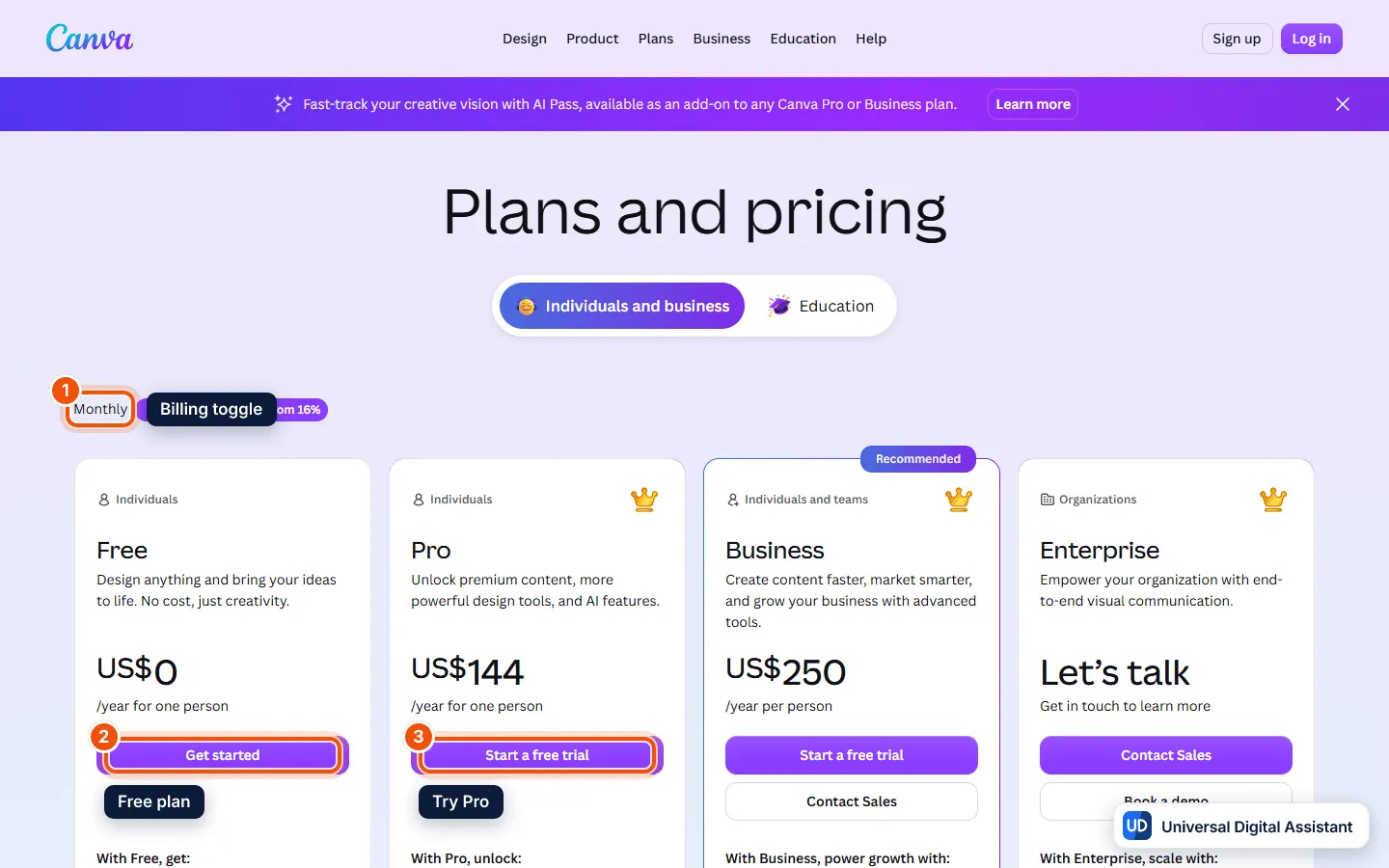
Screenshot: Canva’s US pricing page with yearly prices shown: Free (2), Pro at US$144 a year (3), Business at US$250 a year per person and Enterprise. The toggle (1) switches to monthly prices. Captured by Universal Digital Assistant on October 20, 2026.
Pros
- Editable output, not flat images. Canva AI 2.0 builds designs from separate objects, so you can fix one element without regenerating the whole thing, and Magic Layers does the same for existing images.
- Everything in one place. Templates, stock media, brand kits, AI generation, scheduling and publishing all live in the same app, which suits small teams without a designer.
- On-brand by default. Brand Kits and Brand Intelligence apply your fonts and colors automatically.
- Useful connectors. Pulling context from Slack, Gmail, Notion and Zoom turns Canva into a place to produce finished reports, decks and newsletters, not just social posts.
- A real free plan, with millions of templates and a small AI allowance to try the tools.
- Commercial use is allowed on Canva AI output, according to Canva’s help center.
Cons
- The AI allowance is tight. Pro’s estimate of up to 20 Ultra uses a month is not much if Canva AI 2.0 becomes your main way of working, and the next step, AI Pass, costs $100 a month on top of your plan.
- Usage is hard to predict. Canva measures AI in “uses” that vary with task size, the tools involved and the model, so it’s hard to know in advance what a project will cost.
- Trials don’t show the full product. Ultra tools aren’t available during a free trial.
- Not a specialist image generator. For the most artistic or photorealistic images, dedicated tools are still ahead; see our best AI image generators guide.
- You can’t fully switch it off. Canva says its AI is a core feature, though admins can restrict access and you can change AI privacy settings.
- AI output needs checking. Canva itself warns that results can contain mistakes and may resemble existing designs.
Who should use Canva AI?
Choose Canva if you make lots of everyday visual content, such as social posts, presentations, flyers, ads, newsletters and classroom materials, and you want AI to get you to an editable first draft quickly. Pro at $18 a month is the right plan for one person, and Business at $25 per person adds team tools, more AI and top-ups for busy months. K-12 schools and not-for-profits should check first, because Canva says they can get most premium features free.
If you mainly want striking images rather than layouts, start with a dedicated image model: Nano Banana Pro in Gemini, ChatGPT Images or Grok Imagine. For slide decks built from your own documents, Claude Design is an alternative, and if your project needs voiceovers or narration, our ElevenLabs review covers the leading AI voice tool.
Frequently asked questions
What is Canva AI?
Canva AI is the set of AI tools built into Canva. The headline feature, Canva AI 2.0, lets you describe what you want in a conversation and get a layered, editable design back. It sits alongside tools such as Magic Write, Magic Layers, Canva Code, the image and video generators, background removal, translation and resizing.
Is Canva AI free?
Partly. Canva Free includes up to 20 uses of Standard or Premium AI tools a month, but no Ultra AI tools, which include conversational design with Canva AI 2.0 and video clip generation. Paid plans unlock Ultra tools and a larger monthly allowance.
How much does Canva Pro cost?
As of October 2026, Canva's US pricing page lists Pro at $18 a month or $144 a year for one person, and Business at $25 a month or $250 a year per person. Enterprise is priced on request. Prices exclude tax.
How many AI uses do I get on Canva Pro?
Canva estimates up to 200 uses of Premium AI tools or up to 20 uses of Ultra AI tools a month on Pro, and double that on Business. Standard tools such as Magic Write and Translate don't count against the allowance on paid plans, subject to fair use limits.
What is Canva AI Pass?
AI Pass is an optional add-on for web-managed Pro, Teams, Business and Nonprofits plans. Canva's help center lists it at $100 per person per month, giving 40 times the AI allowance of Pro or 20 times that of Business. It isn't available on Free, Enterprise, free trials or app-store subscriptions.
Can I use Canva AI designs commercially?
Yes. Canva's help center says you can use Canva AI for personal and commercial projects, but warns that AI-generated content may not be unique, can resemble existing designs and may contain mistakes, so you're responsible for checking it before you publish.
Can I turn off Canva AI?
Not completely. Canva's help center says Canva AI is a core feature that can't be fully turned off, although team and school admins can control access to AI features, and individuals can change their AI privacy settings.
Sources
Product facts are checked against the vendor's own announcements and documentation.
- Canva pricing — Canvahttps://www.canva.com/pricing/
- Introducing Canva AI 2.0: Reimagining how the world creates — Canvahttps://www.canva.com/newsroom/news/canva-create-2026-ai/
- Canva AI — Canvahttps://www.canva.com/canva-ai/
- Understanding AI Pass — Canva Help Centerhttps://www.canva.com/help/ai-pass/
- Craft, upgraded: introducing the Canva ProSuite — Canvahttps://www.canva.com/newsroom/news/canva-prosuite-launch/
- Canva expands design with Muse, from Meta — Canvahttps://www.canva.com/newsroom/news/canva-meta-muse/


